
See your product page the way ChatGPT reads it.
ChatGPT, Claude and Perplexity read your page as your server sends it. Anything that loads in afterwards, like reviews, stars or specs, can be missing for them. This guide shows you how to check your own page in about two minutes.
Free. One Chrome extension. No setup.

Five steps, with the screenshots.
- The free extension we use, and where to click
- What to look for when the page reloads
- A note you can send your developer as it is
The guide opens on this page as soon as you send the form.
Check your product page in five steps.
Before you start: when someone opens your product page, it arrives in two parts.
- 1Your store sends the page.
- 2The browser runs your apps and scripts (JavaScript).
- ✓Reviews, stars, specs and price all appear.
- 1Your store sends the page.
- ✕It doesn't run any scripts. It reads what's there and leaves.
- !Anything your apps add later is missing.
Claude's and Perplexity's crawlers work the same way. Google's crawler does run scripts, so Gemini usually sees the full page. The steps below switch scripts off in your own browser, so you see your page the way ChatGPT does.
-
1
Add the free Toggle JavaScript extension.
Open it in the Chrome Web Store and click Add to Chrome, then Add extension.
Open it in the Chrome Web Store
-
2
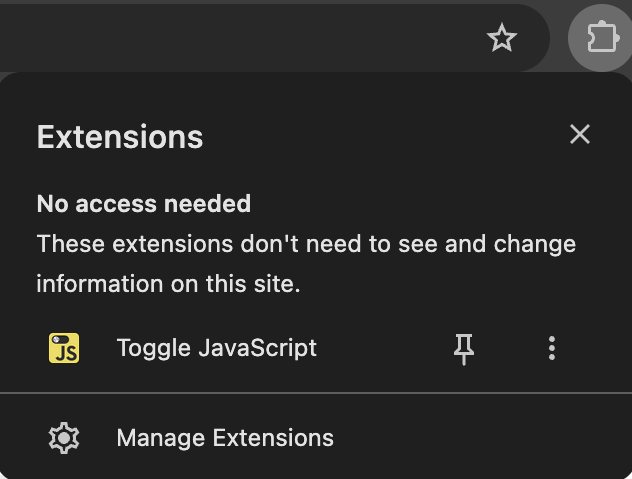
Pin it to your toolbar.
Chrome hides new extensions behind the puzzle piece at the top right. Click the puzzle piece, then the pin next to Toggle JavaScript. Its JS icon now sits in your toolbar.
-
3
Open your bestseller and click the JS icon.
The page reloads with JavaScript off and the icon turns red. It stays off on every site until you click it again.

JavaScript on 
JavaScript off -
4
What's left is roughly what ChatGPT reads.
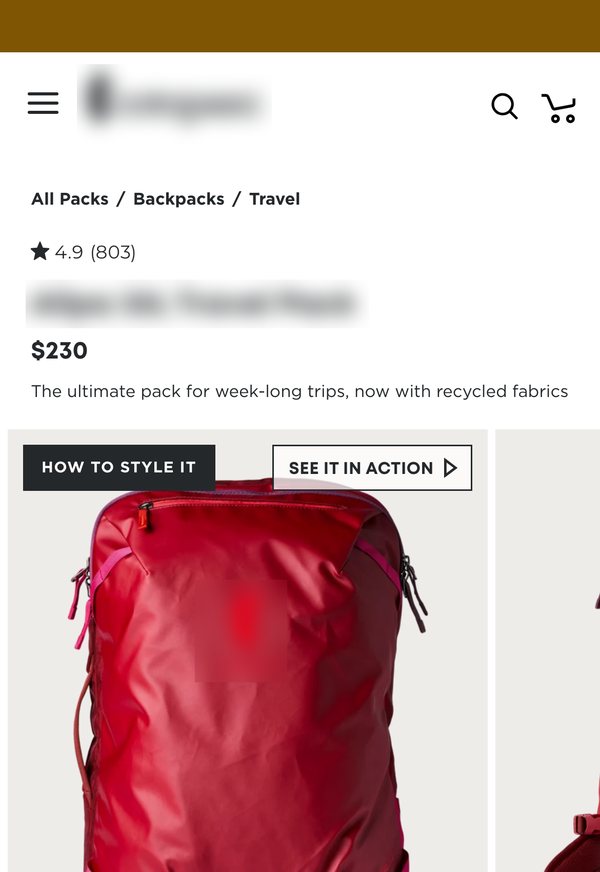
Whatever is still on screen is roughly what ChatGPT reads. On the backpack page at the top, everything under the promo bar went blank.
JavaScript on: price, stars, 803 reviews JavaScript off: all of it gone -
5
Check what's gone.
If any of these vanish, ChatGPT and the others are most likely missing them too. Tick them off as you go.
One exception. Some stores also put the price and star rating into hidden product data in the page, which crawlers can still read even when nothing shows on screen. If something vanished, ask your developer to check that data before changing anything.
Reviews gone? That's the most common one. Review apps often load their widget after the page arrives. Many can also put the reviews straight into the page, so it's worth asking your developer or the app's support.
Then send your developer a note like this.
Run the check on your top three products first. If something vanished, this usually takes one conversation with your developer or your reviews app. Shoppers won't see a difference.
Done? Click the JS icon again, or JavaScript stays off on every site you visit.
Found something missing?
Grab a time with me. We'll open your product page together, I'll show you what ChatGPT can and can't read, and what to fix first.